Subscription Plans & Storage
Understand Chordel's subscription plans and storage limits
Chordel offers different subscription plans to match your songwriting needs. Each plan comes with its own storage quota for audio recordings and uploads.
Available Plans
Each space has its own subscription. If you collaborate in multiple spaces, each space owner manages their own plan.
Free Plan
The Free plan is perfect for getting started with Chordel. It includes:
- 50 MB storage for audio files
- All core songwriting features
- Real-time collaboration
- Unlimited songs and setlists
This is ideal for solo songwriters or bands who primarily work with text-based content like lyrics and chord progressions.
Pro Plan
The Pro plan currently in the development and is designed for professionals and serious musicians who need more storage for their audio recordings and includes several smart features like AI-powered transcription.
It's currently not possible to upgrade your plan directly from the app. Please contact our support team at support@chordel.com to discuss your needs.
Understanding Storage Usage
Your storage quota is used when you upload or record audio files in your songs using Audio Blocks. Each space has its own storage allocation based on its subscription plan.
Checking Your Storage Usage
You can monitor your current storage usage in the Space Settings:
- Click on Space Settings in the sidebar
- Look for the Storage section to see your current usage
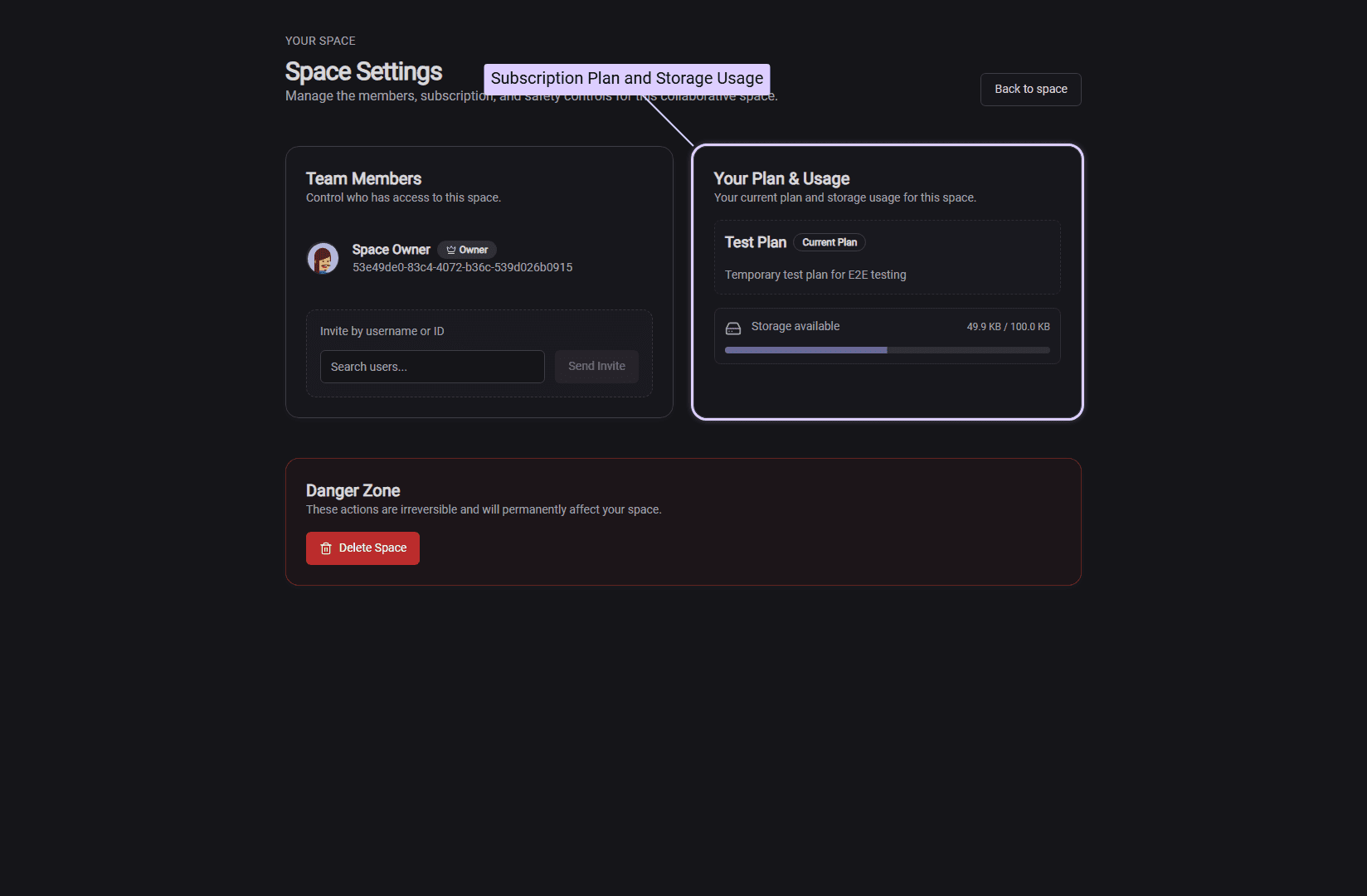
The storage indicator shows:
- Used storage: How much of your quota you've used
- Total quota: Your plan's storage limit
- Usage percentage: A visual progress bar
Storage Warnings
Chordel helps you stay on top of your storage usage with visual indicators:
- Normal usage: When below 90% capacity, everything works normally with no warnings
- Low storage warning: When you reach 90% of your quota, you'll see a "Low" indicator in the sidebar as a reminder to manage your storage
- Storage exceeded: If you exceed your quota, you won't be able to upload or record new audio until you free up space
Managing Your Storage
To free up storage space:
- Delete unused audio blocks: Remove audio recordings you no longer need from your songs
- Remove old demos: Clear out rough recordings that are no longer relevant
- Upgrade your plan: If you consistently need more space, consider upgrading to the Pro plan
When you delete an audio block from a song, the storage is automatically freed up. There's no additional cleanup required.
Frequently Asked Questions
Does storage count toward all spaces I'm in?
No, storage is calculated per space. Each space has its own quota based on its subscription plan. If you're a member of multiple spaces, each space has independent storage limits.
What file formats count toward my storage?
Audio files uploaded or recorded through Audio Blocks count toward your storage. This includes MP3, WAV, and other supported audio formats. Note that uploaded files are automatically optimized to save space.
What happens if I exceed my storage quota?
If you exceed your storage quota, you'll see a warning in the audio block when trying to record or upload new audio. Existing audio files will continue to work normally. To add new audio, you'll need to either delete existing audio or upgrade your plan.
How is storage calculated?
Storage is calculated by summing the size of all audio files associated with songs in your space. When you delete an audio block, that file is automatically excluded from the calculation, freeing up space immediately.